How Long
Track time at your places — automatically. Geofencing and Wi-Fi detection log when you arrive and leave, so you can see your hours, hit your goals, and share progress with friends.
Track time at your places — automatically. Geofencing and Wi-Fi detection log when you arrive and leave, so you can see your hours, hit your goals, and share progress with friends.
Geofencing and Wi-Fi detection log arrivals and departures automatically — no check-ins, no buttons to press.
Set targets like "4 gym sessions a week" with custom days and start dates. Watch your streaks build and stay motivated.
Total hours, average session length, visit counts, and weekly trends — visualized in clear charts you can actually read at a glance.
Streak progress, weekly goals, and friend activity right on your home screen. Theme-aware so they match light or dark mode.
Invite friends with a link or QR code. See real-time activity, control sharing per-place, and cheer each other's streaks.
Visit somewhere often? How Long notices the pattern and suggests adding it as a tracked place — so you never miss one.
Browse all your places on a map with filters and satellite view. Add sub-locations for large venues like malls or campuses.
OS-level geofencing and Wi-Fi instead of constant GPS. High-accuracy GPS only activates briefly at entry and exit events.
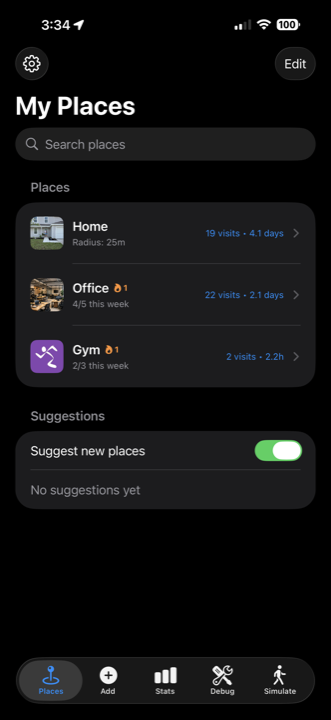
Save the locations you care about — visit counts and weekly progress at a glance.
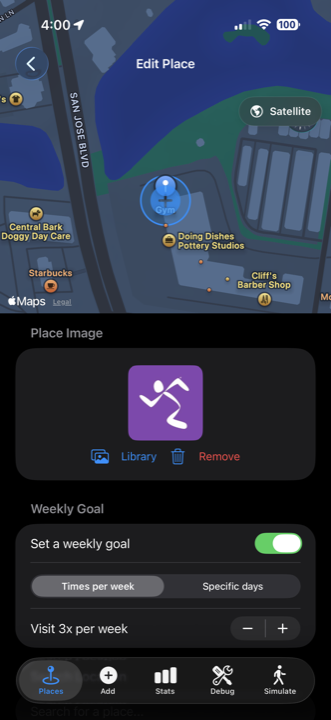
Pick a target like 3 visits a week — or specific days — and watch your streak build.
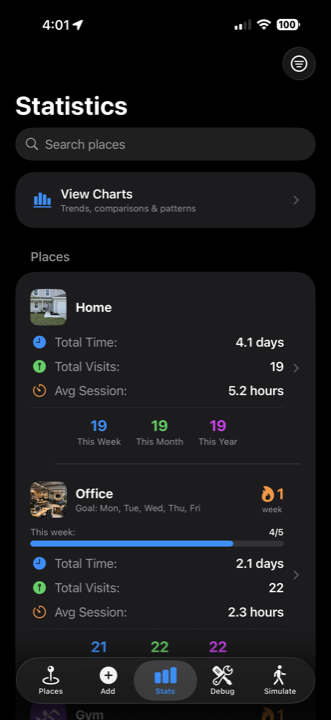
Total hours, average sessions, weekly trends — clear charts that actually make sense.
A one-time purchase that unlocks the full app. No subscriptions, ever.
Save the locations you want to track — the gym, work, a friend's house, your favorite coffee shop. Set a geofence radius and you're done.
How Long runs quietly in the background, using smart battery-friendly detection to log when you arrive and leave each location.
Check your stats anytime — total hours, visit frequency, streaks, and trends. Finally know how much time you're actually spending where it matters.
Download How Long on the App Store and start understanding where your time actually goes.